My Alumnus
Overview
- Year
- 2026
- Role
- UX Research, Concept Ideation
- Deliverable
- Working Prototype
- Duration
- 16 days
- Course
- System Design
0
sTo approve a regular alumnus
Three taps, a real guard, first use.
0
of 27Findings fixed or designed away
Three stay open by decision.
4 to 1
Visitors held in a queue
A model estimate.
0
Final screens
Guard desktop and iPad, admin, dark.
Step 01
Empathize
- Interviews
0
- Field visits
0
- Touchpoints
0
Key takeaways
We went to the gate.
We interviewed three alumni and a guard, then observed the security gate and the administration office.
We scored 21 touchpoints.
Across the alumnus, guard and admin journeys, on five criteria.
No product closes the gap.
None connects the alumni record to the gate decision.
Contextual inquiry: one alumna's entry
- 1
The guards call the admin office
Nobody is available.
- 2
They ask whom she is visiting
A professor, by name.
- 3
They call the professor
He answers and confirms.
- 4
She signs the register by hand
Nobody records her exit.
We observed this entry from arrival to register, at the security gate on a weekday afternoon.
User interviews
“We lost 30 minutes in this whole sequence.”
“They say they're alumni. Then we make an entry and let them go. There's no other procedure.”
“There is a very good chance that he is not available to pick up the call.”
Research methods
0
Interviews
Three alumni and one main-gate guard, one on one.
0
Field visits
Contextual inquiry at the security gate and the administration office.
0
Touchpoints
An experience audit of the alumnus, guard and admin journeys, scored on five criteria.
0
Sources
Secondary research on gate-security practice, the DPDP Act 2023 and UGC safety guidelines.
0
Products taken apart
MyGate, Envoy and Raptor: the guard screen and the visitor credential.
0
Products mapped
A gap analysis of our needs against four existing products.
Gap analysis
Gap
Finding
Silent approvers
No product defines what happens when the approver does not respond. None documents a time limit with a fallback.
Record to decision
No product joins the alumni record to the gate decision. Alumni-ID tools hold the record but have no guard console. Visitor tools have the console but no alumni record.
The empty-handed walk-in
No product verifies a visitor who carries nothing. Each one needs an ID scan, an app credential or someone to vouch in real time.
Step 02
Define
- Observations
0
- Themes
0
- Roles
0
Key takeaways
Graduation removes the only proof.
Alumni hand back their ID on the day they graduate.
Every doubt becomes a phone chain.
The visitor pays for it in waiting time.
The guard decides without information.
The guard answers for every entry and has nothing to check it against.
Evidence base: 50 observations by source
Alumni interviews
15
Gate visit
12
Guard interview
8
Admin office visit
6
Secondary research
6
Competitor teardown
3
Four interviews, two contextual inquiry logs, secondary research and a competitor teardown, broken into single observations.
Affinity diagram
- Alumni interview
- Guard interview
- Gate visit
- Admin office visit
- Secondary research
- Competitor teardown
Every doubt becomes a chain of phone calls
- If the host is unavailable, the guard says "you can't come"
- Guard called a faculty member to identify me
- Host doesn't pick up, so the visitor waits
- Guards consult each other, then their head
- Admin office called, no one available
- Guard asks the visitor for the host's contact number
- One person covers security plus other departments
- Admin often unavailable for gate calls
- NIT Hamirpur SOP: verify by phoning the host before entry
- IILM SOP: confirm with the person being visited, then register entry
- No competitor documents a fallback when the approver doesn't answer
- MyGate: a rejection sometimes never reaches the guard
Access depends on who picks up the phone, not on who the visitor is.
Recognition lives in people, not records
- New guards don't recognise me
- Guards were confused whether I was a student
- Most of the guards had changed
- Earlier guards knew us by face
- Guards have no record to identify us
- If recognised as alumni, no other procedure
- New guards stopped the alumna at the gate
- Workaround: recognised face, let in
When the guards change, the campus forgets its alumni.
Records are written, but never read
- iPad entry sends mail to host (admin and HR visitors only)
- Host learns the visitor never arrived only via a later phone call
- Alumna fills in and signs the register by hand
- 15 to 16 registers plus an iPad at the gate
- Nobody checks the register at shift change
- Exits not tracked, so the 6 PM rule can't be enforced
- Alumni spreadsheet held by a club; admin has no access
- Batch becomes "alumni" by renaming a file
- Incidents kept on paper; can't trace back a month
The process records data but has no memory.
Graduation takes away the only proof
- I gave up my ID card when I graduated
- I show a picture of my old ID card
- Guard wrote my name, class and graduation year in the register
- They asked for my Aadhaar details
- Alumni always remember their ID number
- UGC: compulsory ID cards for students and staff
The only credential that proves you belong is returned the day you graduate.
The visitor pays for the uncertainty
- Being asked "who are you" every time is a pain point
- 30 minutes lost in the whole sequence
- Exhausting when I'm short on time
- Can't let anyone in without knowing where they're going
- Vehicles, deliveries and students interrupt, so the wait gets longer
- Waiting visitors sent to the parking area; 2 to 3 benches
The cost of not knowing falls on the alumnus, as waiting time.
Knowing in advance makes the check disappear
- Wants alumni data available at the checkpoint, unprompted
- If informed in advance, just open the gate
- A gate-side system would reduce his intervention
- IIT Bombay: host generates the gate pass in advance
When the gate already knows who is coming, verification becomes opening the gate.
The rules exist; going digital adds obligations
- Guards stop people briefly because of the CCTV
- UGC: register of visitors with ID proof and contact details
- DPDP Act: consent, right to erasure, applies to digital data
- MyGate passcode isn't linked to a face
Digitising the register turns consent, correction and erasure into product requirements.
How the clusters connect
- 1 and 2: no record to check
- 3: verification by phone
- 4: the visitor pays
- 5: nothing is remembered
- 6: advance knowledge breaks the cycle
We grouped the notes bottom-up, with no categories set first. One observation, the guard's first question (where are you going), stayed unclustered. Cluster 7 is a constraint on the design, not a pain point.
Personas

Research-based
The returning alumnus
Proof of belonging ended at graduation, so the campus treats the returning alumnus as a stranger.

Research-based
The main-gate guard
Answers for every entry with no information to check it against.

Partly inferred
The university admin
Receives escalations but cannot reach the gate.

Proto-persona, to be validated
The student host
Vouches for family visiting the campus.
Four roles touch the gate. The portraits are illustrative, taken from the app's sample records.
Step 03
Ideate
- Questions asked
0
- Led the design
0
- Scenarios
0
Key takeaways
One record.
A student becomes an alumnus through a status change on the same record.
Two consoles.
The guard console is flat and search-first. The admin console holds the dashboard and the reports.
A time limit on every hold.
After 10 minutes the case passes to the admin, so no visitor waits on an unanswered call.
Design principles
01
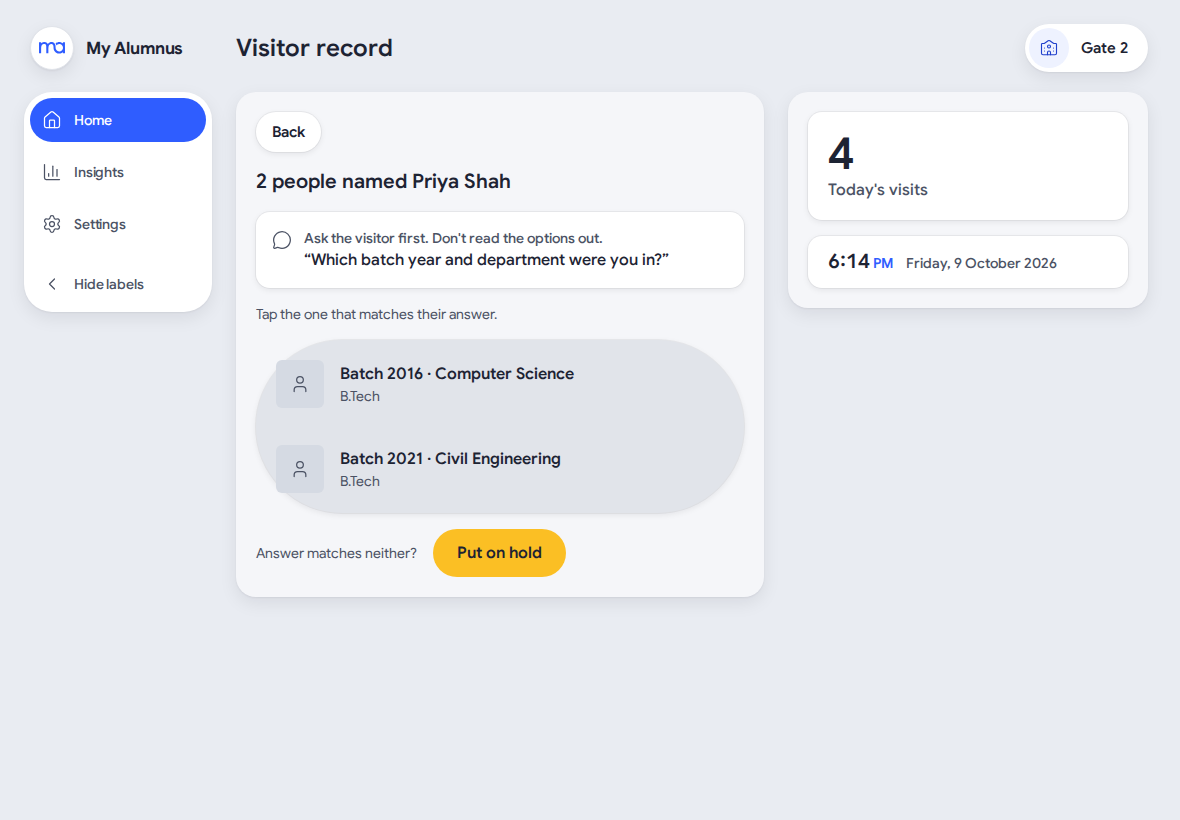
Ask, don't show.
When two names match, we hide both records until the visitor answers a batch and department question.
02
Host first.
The guard calls the host first. The case passes to the admin only if the host cannot confirm. Our field research showed the admin was the least likely to answer.
03
Approve locks outside visiting hours, and says why.
The locked button names the two alternatives, Deny and Put on hold, so the guard never meets an unexplained block.
User flow: a visitor at the gate
A visitor with a matching record skips the hold: search, check the photo, approve. That takes under a minute, against up to 30 today. The full decision logic is in the decision flow below.
Decision flow
A visitor arrives and the guard asks for the name first.
- 1
Does the name match a record?
- One recordCheck the visiting hours
- SeveralAsk batch year or department, then check the hours
- None, or no match after askingFlag and Hold
- 2
Within visiting hours?
- YesCheck the photo
- NoDeny, or Flag and Hold
- 3
Does the photo match?
- YesApprove and log the purpose
- NoFlag and Hold
- 4
Flag and Hold: the admin has 10 minutes
- ApprovesApprove and log the purpose
- DeniesDeny with a reason
- No replyCall the host
- Host confirmsApprove and log the purpose
- Host declines or cannot be reachedDeny with a reason
An approved visit stays open until the guard marks the exit.
Information architecture: guard console
Home: a search bar and today's overview
Search
- Type a name, and the console asks the name first
- Record view: photo, batch and department, purpose field
- Decision bar: Approve, Deny, Flag and Hold
- Flag and Hold screen
- Escalation status: tier, timer, host contact
Expected today
- Expected Today panel
- Opens the same record view
Student-family visit
- Entry for a student's family
- Student record, checked against the student database
- Headcount, time and purpose form
Inside now
- Inside Now panel
- Mark Exit, for one person or a group
- Overstay badge, set by the system
Information architecture: admin console
Admin navigation
Dashboard
- Today's snapshot
- Escalation queue, tier 1 decisions
- Inside list
Alumni database
- Bulk upload by spreadsheet
- Add a single record
- Add a recent photo, batch and department
Visitor list
- Today and upcoming
- Add an expected visitor: host, purpose, photo
Visit history
- Visit and audit log
- Visit detail with the full trail
Security users
- Add or remove a guard account
Campus
- Visiting hours window
- Escalation timeout threshold
Reports
- Weekly review and reports
Step 04
Prototype
- Mockup pages
0
- Contrast pairs held
0
- Accessibility violations
0
Key takeaways
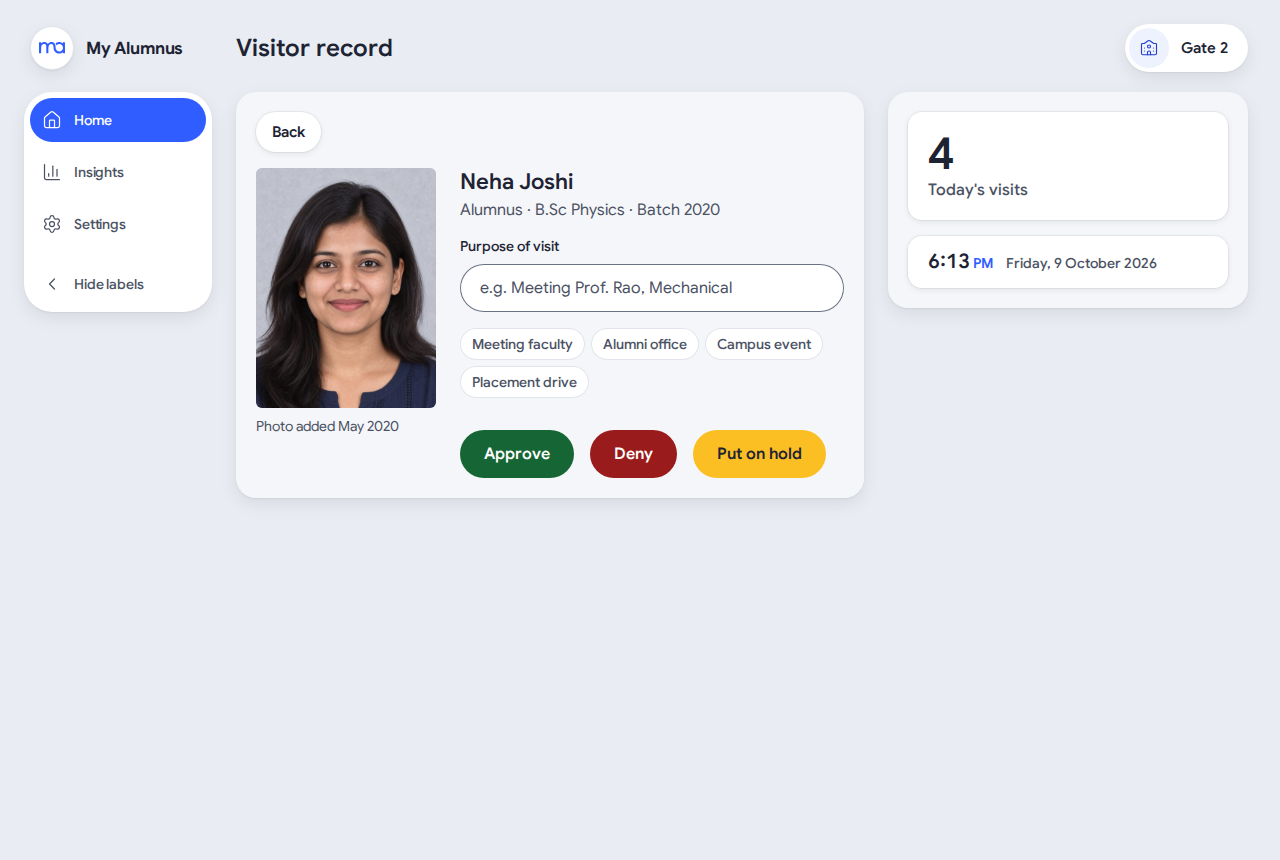
Photo first.
180 by 240, with the age of the photo shown beside it.
Approve locks outside visiting hours, and says why.
The locked button names the two alternatives.
Colour never carries a verdict alone.
Every decision button has an icon and a label.
How it was built
01
The photo is the main check, so it is big.
180 by 240 on the record, with the photo's age shown. No initials avatars: a wrong letter could look like an identity.
02
Colour never carries a verdict alone.
Every decision button has an icon and a label, because a colour-blindness simulation showed Approve and Deny converge.
03
A typeface chosen for a timer.
Google Sans, for its tabular figures, so the escalation timer does not jump as it ticks.
Design system
My Alumnus design system
About 420 tokens. One build writes the CSS, the Tailwind roles and the contrast report.
- 1 Primitives
- 2 Semantic roles
- 3 Component tokens
Colour
Neutral
canvas
divider
text 2
text
Signal, the brand blue
tint
primary
links
focus
Decision buttons
Pressed
Disabled
Focus
Actions and status
Fields
Search alumnus or visitor
Batch year
Enter a 4-digit year, e.g. 2019.
Decision
Type
- Visitor recordPage title 24/32
- Rahul VermaEntity name 22/28
- Check the spellingBody 16/24
- 11:42 AMValue 16/24
- Batch yearLabel 14/20
Space and shape
Contrast gate
81
text and background pairs, each held to its minimum in light and dark. The build fails if one drops.
0
automated violations across 50 mockup pages, in light, dark and forced colours.
The brand blue is 4.30:1 as text, below AA, so links take the darker blue at 6.36:1.
The screens
The record
The photo is the largest thing on the screen. Approve, Deny and Put on hold sit under it.
Before and after the fixes
BeforeAfter
Visitors held at the gate
Mean time at the gate
A simulated queue of 12 visitors, measured on the evaluation build, not re-run on the live app.
How it was tested
Method
Who
What it found
Heuristic evaluation
One expert evaluator
22 findings: 4 major, 11 minor, 7 cosmetic
Cognitive walkthrough
Expert, as the guard and admin personas
13 tasks: 8 clean, 5 with a failure story
Simulation
A script on the real guard console
A queue of 12 visitors: holds 4 to 1
Think-aloud
One working security guard, live app
4 of 5 tasks completed; 1 approval silently not saved
Outcome
Results
- Real user observed
0
- Methods expert or model based
0
of 4- Pilots at a real campus
0
Key takeaways
One evaluator.
One evaluator, who also built the app, ran the heuristic evaluation. Three of the four testing methods are expert or model based.
One real user.
A single think-aloud session with one working guard observed a real user. One approval in four was not saved and showed nothing. We reported it and left it unfixed.
No pilot yet.
The demo runs on fictional data that resets every night. No pilot has run at a real university.
What is still open
- In the think-aloud session, one of four approvals was not saved and showed nothing. We reported it and left it unfixed, by the project owner's decision.
- A visitor whose photo did not match was admitted after the host confirmed by phone. The host confirms the visit, not who stands at the gate. We accept this risk.
- Expected visits can still be booked outside visiting hours. The admin has no gate phone number. A decision cannot be undone.
Pilot targets
Metric
Today
Pilot target
So far
Time to a decision, regular alumnus
Up to about 30 min
Under 1 min
15 s, 3 taps (one guard)
Visitors decided without a hold
Near zero
Most visitors
11 of 12 (simulation)
Holds resolved within 10 minutes
No limit
Every hold
Both held visitors (one session)
Visits with a recorded exit
None
Every visit
Marked without help (Hindi)
Decisions saved and confirmed
No baseline
No silent failures
1 of 4 approvals lost
The app runs on sample data, so none of these are pilot results yet. The targets are hypotheses to agree with a pilot university.
Next steps
01
Show the result of every decision
Show Saving on tap and an error if nothing comes back, so a silent failure cannot happen.
02
Settle the photo-mismatch rule
Decide the identity rule before any real pilot.
03
Test at a real gate
Run the prepared pilot with three guards and two admins, and replace predictions with observed behaviour.
Step 05
Learnings
Key takeaways
Pair interviews with field visits.
Interviews gave us each person's account. The gate visits let us check it against what happened.
Say how firm the evidence is.
We state what each number rests on, so a reader can judge it.
Trust matters more than speed.
The routine approval took 15 seconds, yet one in four approvals was lost without a sign.
What I would do differently
- Time a week of the paper register at a pilot gate before launch, so every target has a measured baseline. Our baselines are accounts from four interviews and two visits.
- Run the think-aloud with more than one guard, and observe a real admin using the admin console. Neither has happened yet.
- Test on the working app earlier. The lost approval and the wrong default reason appeared only there, not in the clickable prototype.
Methods in this project
Stage
Methods
Empathize
Interviews, contextual inquiry, experience audit, secondary research, artifact analysis, gap analysis
Define
Affinity diagram, empathy maps, mental models, personas, problem statement
Ideate
How might we questions, scenarios, information architecture
Prototype and test
Wireframes, mockups, a design system, a working app, heuristic evaluation, cognitive walkthrough, simulation, think-aloud
Full case study
Get in Touch